> For the complete documentation index, see [llms.txt](https://simplemetalens.gitbook.io/docs/llms.txt). Markdown versions of documentation pages are available by appending `.md` to page URLs; this page is available as [Markdown](https://simplemetalens.gitbook.io/docs/smd-pro/topical-discussions/how-to-add-user-defined-unit-cell-to-unit-cell-library.md).
# How to Add User-Defined Unit Cell to Unit Cell Library
If you have your own unit cell data (phase and transmittance) simulated by RCWA/FDTD[^1], you can add them to the Unit Cell Library in SMD PRO. Here is how to:
{% hint style="success" %}
If you're adding unit cell data that were used for SMD Tool, skip Step 1 and go to Step 2.
{% endhint %}
{% stepper %}
{% step %}
**Generate a unit cell data template for SMD PRO.**
Click 'UTILITIES' in the sidebar in SMD PRO. Select the shape of your unit cell (top view) and click GENERATE to generate the template. If needed, click the info icon () to see details about unit cell shapes available in SMD PRO.
{% endstep %}
{% step %}
**Replace data in the template with your unit cell data.**
Replace data values in the template file with your unit cell data (instructions are provided in the file). If you are using unit cell data that were used for SMD Tool, convert the data format so it's compatible with SMD PRO. See [How to Convert SMD Tool's Unit Cell Data for SMD PRO](/docs/smd-pro/topical-discussions/how-to-convert-smd-tools-unit-cell-data-for-smd-pro.md) for details.
{% endstep %}
{% step %}
**Load unit cell data to unit cell library.**
In BUILD module, click 'ADD UNIT CELL' and select the unit cell data file that you just edited in Step 2. Enter unit cell information on the right side of the library view and click 'SAVE DATA'. If needed, click the info icon () next to parameters to see details.
{% endstep %}
{% step %}
**Check your unit cell info in unit cell library.**
Your unit cell data is now added to the library and ready for use to build metalenses! Optionally, you can delete the .csv file as it is not needed anymore.
If you need to edit some info (e.g., you entered a wrong wavelength by mistake), then select the unit cell to edit and correct the value(s) and click SAVE DATA. When prompted, click 'OK' to replace the existing data.
{% hint style="warning" %}
If you found out some values in the unit cell data file (.csv) were incorrect after loading it to the library, then you must remove the unit cell from the library and start from Step 2 again. To remove, select the unit cell and click the trash icon .
{% endhint %}
{% endstep %}
{% endstepper %}
[^1]: Here are some free software tools.
1. [RCWA Simulator](https://zenodo.org/records/19986236)
2. [MAXIM](https://data.mendeley.com/datasets/352jpd593h/1)
3. [Meep](https://meep.readthedocs.io/en/latest/)
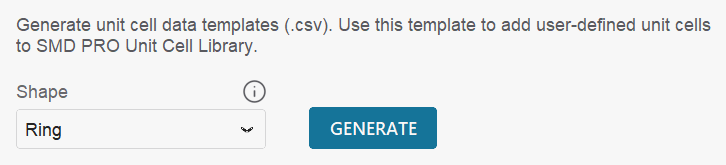
 ) to see details about unit cell shapes available in SMD PRO.
 .
{% endhint %}
{% endstep %}
{% endstepper %}
[^1]: Here are some free software tools.
1. [RCWA Simulator](https://zenodo.org/records/19986236)
2. [MAXIM](https://data.mendeley.com/datasets/352jpd593h/1)
3. [Meep](https://meep.readthedocs.io/en/latest/)
.
{% endhint %}
{% endstep %}
{% endstepper %}
[^1]: Here are some free software tools.
1. [RCWA Simulator](https://zenodo.org/records/19986236)
2. [MAXIM](https://data.mendeley.com/datasets/352jpd593h/1)
3. [Meep](https://meep.readthedocs.io/en/latest/)